Unlock Creativity with Tennytech Google Slides
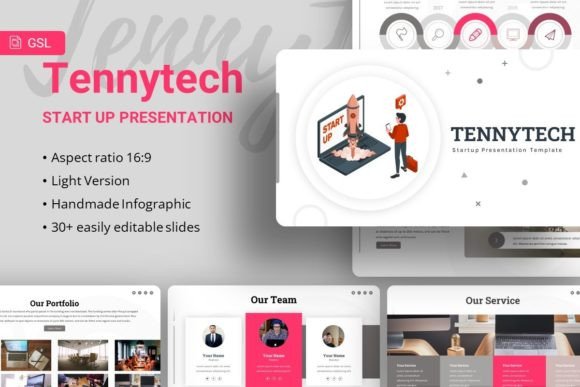
Tennytech Startup Google Slides Template is a versatile and powerful tool designed to help you create impactful presentations. Whether you're a creative agency, a corporate business, or an individual looking to showcase your portfolio, this template offers a range of features that can elevate your content and engage your audience.
Why Choose Tennytech?
The Tennytech template stands out for its flexibility and ease of use. With 35 slides, each one meticulously crafted, you have the freedom to customize and tailor your presentation to fit your specific needs. The handcrafted infographics and pixel-perfect illustrations add a professional and polished touch to your content, making it visually appealing and effective.
Creative Possibilities and Applications
One of the most exciting aspects of the Tennytech template is its versatility. Here are some creative ways you can use it:
- Creative Agency Presentations: Use the template to pitch your agency's services, showcasing past projects and client testimonials in a visually engaging way.
- Corporate and Business Reports: Transform dry data into compelling stories with the help of clean, modern layouts and customizable charts.
- Personal Portfolio: Create a standout portfolio that highlights your skills, achievements, and personal brand, perfect for job interviews or freelance pitches.
- Photography and Art Showcases: Display your best work in a gallery-like format, using the picture placeholders to insert and arrange your images effortlessly.
Adapting for Different Goals and Audiences
Whether you're presenting to a board of directors, a potential client, or a group of students, the Tennytech template can be adapted to suit various audiences and contexts. Here’s how:
- Customize Content: Tailor the text and visuals to match the tone and message of your presentation. Use the master slides to ensure consistency across all pages.
- Engage with Infographics: Utilize the handcrafted infographics to break down complex information into easily digestible visuals. This is particularly useful for educational or training presentations.
- Showcase Your Brand: Incorporate your branding elements, such as logos and color schemes, to maintain a cohesive and professional look throughout your presentation.
- Interactive Elements: Add interactive elements like links and embedded videos to make your presentation more engaging and dynamic.
Practical Tips for Effective Presentations
To make the most of the Tennytech template, consider these practical tips:
- Keep It Clear and Concise: Use simple, straightforward language and avoid cluttering your slides with too much information. Focus on key points and supporting visuals.
- Use High-Quality Images: While the template includes placeholders, make sure to use high-quality images from sources like Unsplash, Pixabay, and Pexels to enhance the visual appeal of your presentation.
- Consistency is Key: Maintain a consistent design throughout your presentation. Use the same fonts (like Roboto, which is included) and color palette to create a cohesive look.
- Practice and Prepare: Rehearse your presentation multiple times to ensure smooth delivery. Familiarize yourself with the flow and timing of your slides to keep your audience engaged.
In Conclusion
The Tennytech Startup Google Slides Template is not just a set of pre-designed slides; it's a comprehensive tool that empowers you to create professional, engaging, and memorable presentations. Whether you're a seasoned designer or a first-time presenter, this template provides the flexibility and resources you need to bring your ideas to life. Start exploring the endless possibilities and see how Tennytech can transform your next presentation.
Don't forget to check the documentation file for detailed instructions and tips on how to get the most out of the template. Happy creating!