Heliocraft Google Slide Template: Elevate Your Presentations
Imagine a design tool that not only enhances your presentations but also aligns seamlessly with your brand identity. The Heliocraft Google Slide Template is precisely that, offering a versatile and visually striking solution for designers, marketers, and business owners.
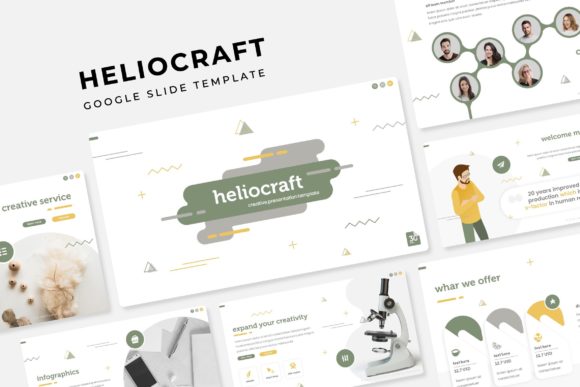
The Heliocraft template features 150 total slides, divided into 5 premade color variations, each with 30 unique slides. This variety allows you to choose the perfect aesthetic for your project, whether it's a corporate presentation or a creative portfolio. Each slide is meticulously crafted to ensure a professional and polished look, making it an invaluable asset for any visual communication.
Key Features of Heliocraft Google Slide Template
- 150 Total Slides: A comprehensive collection to cover all your presentation needs.
- 5 Premade Colors: Choose from 5 distinct color schemes, each with 30 slides, to match your brand's palette.
- Handcrafted Infographics: Professionally designed infographics to help you present data and information clearly.
- Section Break Slides: Clean and organized section breaks to structure your content effectively.
- Gallery and Portfolio Slides: Showcase your work in a visually appealing manner.
- Resizable and Editable Graphics: Fully customizable graphics and picture placeholders for a tailored look.
- Drag and Drop Based on Master Slides: Easy-to-use templates with a consistent design across all slides.
- Pixel-Perfect Illustrations: High-quality illustrations that add a professional touch to your presentations.
What’s Included in the Heliocraft Package
- 5 PPTX Files: Standard format for easy compatibility with various devices and software.
- 5 PPTX Widescreen Files: Ideal for modern widescreen displays, enhancing the visual impact.
- 5 Premade Color Variations: A range of color options to suit different branding requirements.
- Readme First File: Detailed instructions and tips for using the template effectively.
- Free Font Download Link: Access to the fonts used in the template, ensuring consistency in your design.
Note: All photographs or pictures used in the preview are not included; they are intended for illustration purposes only.
Practical Applications and Creative Uses
The Heliocraft Google Slide Template is not just a set of slides; it's a powerful tool for creating impactful visual communication. Here are some practical applications:
- Branding and Logo Design: Use the template to create consistent and professional presentations that align with your brand's visual identity.
- Marketing Materials: Develop compelling marketing collateral, such as brochures, flyers, and social media posts, that capture attention and drive engagement.
- Social Media Content: Create visually appealing posts and stories that resonate with your audience and enhance your brand's online presence.
- Website and UI Design: Utilize the template to design user-friendly and visually cohesive web pages and interfaces.
- Editorial Layouts: Craft clean and organized layouts for magazines, newsletters, and reports, ensuring readability and professionalism.
- Packaging Design: Develop eye-catching packaging designs that stand out on the shelf and communicate your brand's message effectively.
- Advertising Campaigns: Create cohesive and impactful advertising campaigns that align with your brand's visual language.
- Presentations: Deliver engaging and well-structured presentations that leave a lasting impression on your audience.
- Merchandise: Design high-quality merchandise, such as t-shirts, mugs, and other promotional items, that reflect your brand's style.
- Digital Products: Create digital products, such as eBooks, whitepapers, and guides, that provide value to your audience and enhance your brand's reputation.
Tips for Effective Use of the Heliocraft Template
To make the most of the Heliocraft Google Slide Template, consider the following tips:
- Maintain Consistency: Use the same color scheme, typography, and design elements throughout your presentation to create a cohesive and professional look.
- Focus on Readability: Ensure that your text is legible and well-organized, using appropriate font sizes and line spacing.
- Use Visual Hierarchy: Prioritize your content by using size, color, and placement to guide the viewer's attention and highlight key points.
- Customize Creatively: Take advantage of the editable graphics and picture placeholders to add your own images and custom elements, making the template uniquely yours.
- Test Across Devices: Preview your presentation on different devices and screen sizes to ensure it looks great everywhere.
Thoughtful design choices and the use of quality creative assets like the Heliocraft Google Slide Template can significantly improve both the aesthetics and the effectiveness of your visual communication. By leveraging the template's features and following these tips, you can create presentations that not only look professional but also resonate with your audience and achieve your design goals.